

Are Your Employees Using AI Safely?A Guide to Microsoft Copilot, ChatGPT and Business Data Security
Artificial Intelligence (AI) has quickly become part of everyday business life. From drafting emails and creating marketing content to analysing data and carrying out research, businesses across the UK are increasingly using AI tools such as Microsoft Copilot and ChatGPT to improve productivity.
However, during conversations with our clients recently, we’ve noticed a surprising trend.
Many organisations are unaware that Microsoft Copilot is already available within parts of their Microsoft 365 environment. At the same time, some businesses are paying separately for individual AI subscriptions or allowing employees to sign up for personal AI accounts, often without fully understanding the security and data protection implications.
While AI can deliver significant productivity benefits, it’s important to ensure the right tools are being used in the right way.
Not All AI Platforms Offer the Same Level of Protection
 One of the biggest misconceptions surrounding AI is that all paid accounts provide the same level of security.
In reality, there is a significant difference between consumer AI services and enterprise AI services.
Many organisations assume that purchasing ChatGPT Plus or ChatGPT Pro for employees automatically provides business-grade security. However, these subscriptions are designed primarily for individual users rather than corporate environments.
The same principle applies to many free AI tools available online. Whether it’s a free chatbot, AI writing assistant, image generation platform or research tool, businesses should be extremely cautious about allowing confidential information, customer data, financial information, contracts, employee records or intellectual property to be entered into systems that have not been approved by the organisation.
Without appropriate controls, businesses may be exposing sensitive information to unnecessary risks.
Why Does This Matter?
Historically, some AI platforms have used user prompts and conversations to improve and train their models.
This means that information entered into certain personal or free AI services may be processed differently from enterprise-grade platforms that provide commercial data protection commitments, administrative controls and contractual assurances.
For businesses handling customer information, financial records, legal documents, commercial agreements or other sensitive data, understanding how AI providers manage and protect data is essential.
This is particularly important when considering information security obligations, contractual requirements and wider data protection responsibilities.
Organisations handling personal data should also consider their obligations under UK GDPR and the Data Protection Act 2018 when deciding which AI tools employees are permitted to use.
Which AI Platforms Can Businesses Trust With Their Data?
When evaluating AI tools for business use, organisations should look for services that provide:
- Enterprise-grade security
- Data protection commitments
- Administrative controls
- User management
- Audit capabilities
- Compliance with recognised security standards
- Clear statements regarding model training and customer data
Examples include:
Microsoft Copilot for Microsoft 365
Microsoft Copilot for Microsoft 365 operates within your Microsoft 365 environment and applies existing permissions, compliance settings and security controls.
This means users can only access information they already have permission to see, helping organisations maintain existing access controls and governance requirements.
Microsoft Copilot Chat (Work Account)
Organisations using Microsoft 365 can also access Copilot Chat when users are signed in with their work account. This provides enterprise data protection, making it a far safer option than many consumer AI services for day-to-day business tasks.
ChatGPT Business and Enterprise
OpenAI’s business-focused plans provide additional security, administrative controls and data handling commitments designed specifically for organisational use.
These offerings are fundamentally different from personal ChatGPT subscriptions and should be considered where ChatGPT is the preferred AI platform.
The Hidden Cost of Personal AI Accounts
We’ve encountered several businesses that have purchased individual ChatGPT Plus or Pro subscriptions for employees without realising there may be more appropriate business-grade alternatives available.
In many cases, these organisations already have access to Microsoft AI capabilities through their existing Microsoft 365 licensing but simply aren’t aware of them.
As a result, they may be:
- Paying twice for similar functionality
- Creating unnecessary security risks
- Losing visibility of how AI is being used across the business
- Struggling to manage compliance requirements
- Allowing company information to be entered into uncontrolled systems
Before purchasing additional AI subscriptions, it’s worth reviewing what is already included within your existing Microsoft licensing.
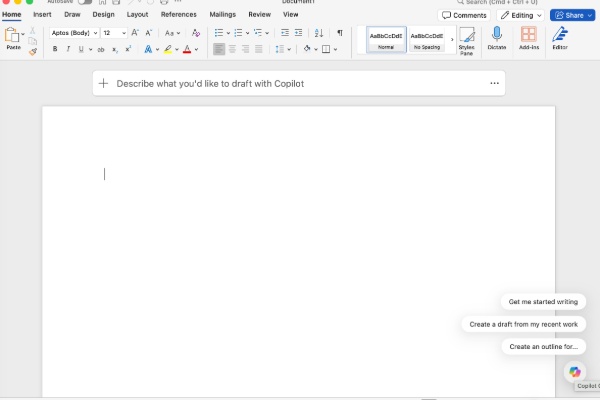
Getting Started with Microsoft Copilot
For many businesses, Microsoft Copilot is the easiest place to begin their AI journey.
For organisations already using Microsoft 365, Copilot provides a familiar and secure way to introduce AI into everyday workflows without requiring employees to move data into separate third-party systems.
Depending on your Microsoft 365 licensing, Copilot can be accessed through:
- The Copilot web interface when signed in with your work account
- The Microsoft Copilot desktop application
- Microsoft Teams
- Word
- Excel
- PowerPoint
- Outlook
- Other Microsoft 365 applications
Many businesses are surprised to learn that AI functionality is already available within tools they use every day.
For organisations requiring more advanced capabilities, Microsoft also offers additional Copilot licences, upgrades and consumption-based AI services to support higher usage levels and more complex business requirements. Additional AI credits and premium features are available where greater functionality or usage is needed.
The right option will depend on how your organisation intends to use AI and what level of functionality is required.
Don’t Forget Your Policies
Introducing AI into the workplace isn’t just about selecting the right technology.
Businesses should also ensure their policies and procedures are updated to reflect the use of AI systems and provide clear guidance to employees.
 Areas to consider include:
- Acceptable Use Policies
- Information Security Policies
- Data Protection Policies
- Employee Handbooks
- Remote Working Policies
- Confidentiality Requirements
- Customer Data Handling Procedures
Policies should clearly define:
- Which AI tools employees are permitted to use
- Which AI tools are prohibited
- What types of data can and cannot be entered into AI systems
- Requirements for human review of AI-generated content
- Approval processes for adopting new AI technologies
- Training requirements for staff
- Responsibilities for checking the accuracy of AI-generated content
AI should be viewed as an assistant, not a decision-maker. Human oversight remains essential to verify accuracy, identify errors and ensure compliance with legal, regulatory and business requirements.
AI is quickly becoming a valuable business tool, but adopting it safely is just as important as adopting it quickly.
Before investing in additional AI subscriptions or allowing employees to use personal AI accounts for business purposes, take the time to understand what protections are in place and what tools may already be available within your existing technology stack.
You may discover that you’re already paying for AI capabilities through Microsoft 365 and that, with the right configuration, training and policies, your organisation can benefit from AI while maintaining strong security and data protection standards.
If you’re unsure which AI tools are appropriate for your business, or whether your Microsoft 365 licences already include AI capabilities, our team can help. We work with businesses across Wiltshire, Hampshire and Dorset to ensure Microsoft 365, Copilot and other business technologies are being used securely, effectively and in line with data protection requirements.
Group CyberSecurity Training – In Person
In‑person, group cyber security training for company employees, delivered face to face. Interactive sessions cover key topics including phishing awareness, internet safety, secure connections, and more, with quizzes and an introduction to relevant IT and security policies included.
read more
Online Interactive CyberSecurity Training
Online cyber security training for employees and remote workers, delivering continuous security awareness through realistic phishing simulations. Access dozens of expert‑led training videos, each up to 90 minutes long, available on demand 24/7 to reinforce learning and reduce cyber risk.
read more
Individual CyberSecurity Training, in-person
In‑person, one‑to‑one IT security training for employees, delivered face to face. Each individual session covers essential topics such as phishing awareness, internet safety, secure connections, and more, with interactive quizzes and security policy introductions included.
read more